


Western Union Send Money Now
4.7151.81K Reviews
App Specs
- Version
- 16.4
- Updated On
- License
- Free
- Downloads
- 10,000,000+
- Developer
- Western Union Apps
- Categories
- Finance
- Platform
- Android, iOS
Screenshots

 Analysis by AppCompare
I judge an international money-transfer app less by its promise of speed than by how clearly it lets me understand a payment before I commit. With Western Union Send Money Now, the practical question is whether the details of a particular transfer are clear enough for me to make a calm decision: who will receive the money, how it is meant to arrive, and what the displayed cost and exchange rate mean for that transaction. That matters more than a reassuring headline, especially when a relative is depending on the funds.
Trust starts with the transfer in front of you
This is a finance app from Western Union Apps, and its purpose is specific: arranging international transfers and remittances. It is free to download, but that does not mean every transfer is free. Fees and exchange rates can affect the amount the recipient gets, so I would treat the quote shown for a particular payment as the information to check—not assume that one transfer’s cost tells me what another will cost.
I also would not make a decision based only on a familiar company name or a large user base. The app has a 4.7 average from around 344,000 ratings and more than 10 million installs, which suggests many people use it, but those figures do not tell me whether my own destination, payment route, or recipient’s preferred method is a good fit. I would still read each transfer summary carefully before confirming it.
What I check before sending
The useful habit here is to pause at the final review rather than tap through on autopilot. I would compare the amount I intend to pay with the amount the recipient is expected to receive, then check the destination and chosen payout method. If I am sending to someone whose details I have not used before, I would confirm them with that person through a separate, trusted channel. A small spelling or account-detail mistake can matter more than a polished screen.
Money movement is also a data-sensitive activity. A transfer involves personal and financial information, so I would use the app only on a device I control, keep its access protected, and avoid entering payment details while connected to an unfamiliar or shared device. Those are sensible precautions rather than a claim about a particular permission or privacy setting. I would inspect the choices shown in the app itself and make my own call about what information I am comfortable entering.
Visibility is useful, but it is not a guarantee
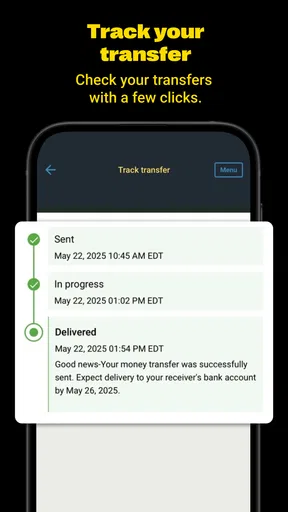
Being able to follow a transfer can make the waiting period less uncertain. Still, a status update is not the same thing as money already being available to the recipient. If someone needs funds for a time-sensitive expense, I would check the estimated delivery details shown for that transfer, share the reference or status information only as appropriate, and avoid promising an arrival time that the app has not confirmed.
That distinction is one reason I would not use an international transfer as an emergency plan without a backup. A recipient may need to take an additional step to collect money, and the route available to them can affect how convenient the transfer is. Before sending a larger amount, I would make sure the recipient understands what to expect and can use the selected receiving method.
Worth Reading Before You Choose

Flipboard Shows What News Apps Must Do Beyond the Feed

Switching to Android Auto Means Rethinking Your Driving Routine

Google Calendar Makes a Crowded Week Easier to Manage

Ludo King Makes the Most of the Minutes Between Plans

Baby Panda World Brings Quick Play to Modern Phones, but Its Game Library Feels Busy

ESPN’s Live Game View Makes Following Close Games Easier
Who will find it useful—and who may prefer another route
I can see this app suiting someone who regularly supports family in another country, especially when the recipient needs a transfer arranged through a familiar remittance service rather than a shared budgeting or banking app. It may also be useful when the sender wants a single place to set up a transfer and follow its progress. The app is rated Everyone, and its current version is 16.2; those details describe the app’s listing, not a guarantee that every financial decision is suitable for every person.
For a person who sends money only occasionally, a bank transfer or another established payment option may be simpler if it already works for both sides and offers a better overall cost for that route. I would compare the total amount paid and received, not just the fee displayed prominently. Someone who needs a broad personal-finance tool, detailed spending plans, or a way to manage everyday bills should also look elsewhere: this app is built around international transfers, not as a complete financial dashboard.
Using the app with care
In an ordinary family scenario, I might be helping a relative cover a planned expense abroad. I would first ask which receiving method they can actually use, then enter the destination and amount and inspect the quote. Before confirming, I would check that the recipient’s details match what they gave me and that the amount they expect to receive is sensible. After sending, I would keep the confirmation information until the recipient says the funds are available. That simple sequence reduces avoidable confusion without assuming that every transfer follows the same timetable.
A useful trade-off is convenience versus comparison. Starting a transfer in one app can save time, but it can also make it tempting to accept the first option without checking whether a bank or another remittance provider would suit that specific payment better. For a recurring transfer, I would compare the full cost and recipient experience periodically rather than relying on memory from a previous transaction. A route that was convenient last time may not be the best fit for a different amount or destination.
If the transfer is meant to pay a business or service, I would confirm the recipient’s payment instructions independently before sending. Remittance tools are designed to move money, but that does not by itself verify that a request is legitimate. I would be especially cautious if someone pressures me to send immediately, changes their details unexpectedly, or asks me to keep the payment secret. In that situation, pausing to confirm the request is more important than finishing quickly.
Before relying on the app, I would also consider how I want to handle account access. A personal device with a screen lock is a better place to manage financial activity than a device used casually by several people. I would sign out or secure access when appropriate and avoid sharing verification messages or account credentials. These are practical habits for any money service; they do not imply that a particular security control is available in every version or region.
Western Union’s app has been available since August 18, 2011, and the long-running presence may make it recognizable to people who already use the service. I still see recognition as a starting point, not a substitute for checking the actual transaction. The route, recipient requirements, exchange rate, and fee are the details that shape whether a transfer works for me. Taking a moment to review them is a better measure of confidence than rushing because the brand feels familiar.
People often want to know whether a transfer will arrive instantly, whether the recipient can collect it in their preferred way, and whether the quoted cost will remain the same. I would not assume a universal answer: I would check the estimate and options presented for the destination and payment I have selected, then make sure the recipient can follow those instructions. If the app shows a detail I do not understand, I would resolve that before confirming instead of treating the transfer as reversible or guaranteed.
Another practical question is whether this is the right choice for a small, one-off payment. My answer depends on the total cost and convenience for both people. For a modest amount, a fee or an unfavorable exchange rate can weigh more heavily than it would on a larger transfer, so I would compare what the recipient actually gets. If both people already have a suitable bank-based option, that may be easier; if the recipient needs a remittance route, Western Union may be more relevant.
Storage and account choices deserve the same attention as the payment screen. I would keep a record of the confirmation in a way that does not expose sensitive details to other people, and I would avoid sending screenshots containing personal information unless there is a clear reason. If I use the app on a shared device, I would be more cautious about saved access and notifications. These small decisions help me keep control of the information around a transfer, not just the transfer itself.
My overall view is deliberately measured: this is a focused way to arrange international remittances, not a reason to stop comparing options or checking recipient details. It is most compelling when its available route matches what the receiver can use and the displayed terms make sense. If I cannot verify the person or payment request, or if another method is clearer and less costly for both sides, I would choose that instead.
Getting Started with Ease
First off, downloading and setting up Western Union Send Money Now is a piece of cake. Available on both Android and iOS, it’s just a quick search and click away in the app store. Once you’ve got it, the registration process is straightforward. You just need to fill in your basic details, verify your identity, and you’re good to go. This app is all about making life simple and fast, which is evident from the get-go.
Sleek and User-Friendly Interface
The interface is pretty slick. Navigating through the app is intuitive, with everything laid out in a neat and organized manner. The homepage displays all the essential functions like sending money, tracking transfers, and viewing transaction history. It’s like having a mini financial hub right in your pocket. Each feature is just a tap away, which makes the whole experience feel seamless. No need to jump through hoops to get where you need to be.
Sending Money: Quick and Reliable
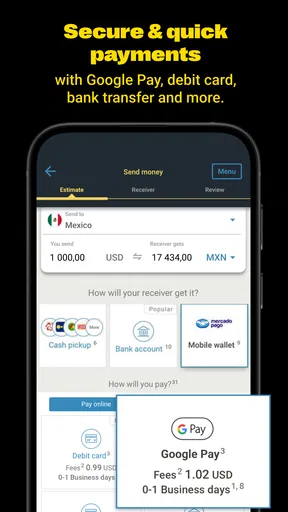
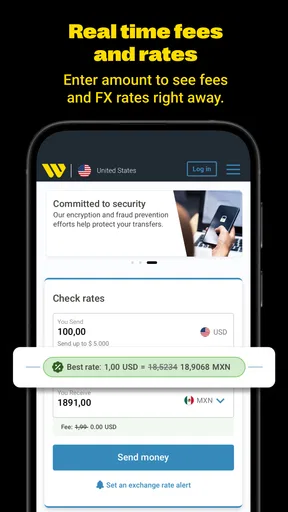
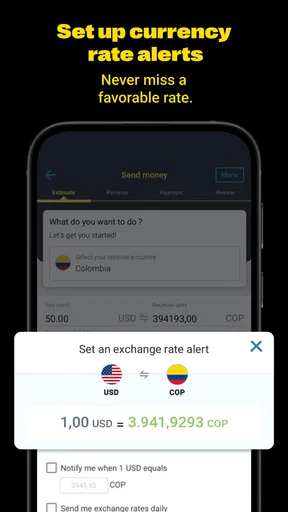
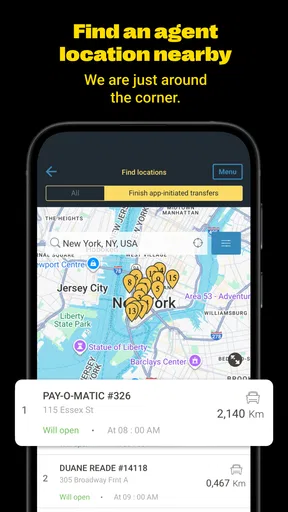
Now, onto the main event—sending money. With Western Union Send Money Now, it’s as easy as pie. You choose the destination, enter the amount, and pick your payment method. The app provides a variety of payment options, whether it’s through a bank account, credit card, or even cash at an agent location. What’s sweet is the app shows you the exchange rates and fees upfront, so there are no nasty surprises later.
Once you confirm the details, the transfer is usually processed within minutes. I’ve tested it a few times, and each transaction went through without a hitch. It’s a relief to know that your money reaches where it needs to be, swiftly and securely.
Tracking and Notifications
One of the standout features for me is the tracking capability. You get real-time updates on your transfers, which is super reassuring. The app sends you notifications at various stages of the transaction, so you’re always in the loop. No more biting your nails wondering if the funds have reached the recipient. It’s like having a personal assistant keeping tabs on your transfers.
Security Measures
In today’s world, security is a biggie, and Western Union doesn’t skimp on this. The app is equipped with robust security protocols to protect your information and transactions. From data encryption to secure logins, you can rest easy knowing your financial details are in safe hands. Plus, it offers additional security features like two-factor authentication, which adds an extra layer of protection.
A Few Final Thoughts
So, is Western Union Send Money Now the perfect app for everyone? Well, it certainly ticks a lot of boxes for me. It’s fast, efficient, and user-friendly—everything you’d want in a money transfer app. Whether you’re sending funds to family abroad or paying for international services, this app makes the process hassle-free.
Of course, like any app, it might not be tailored for every single need, but for the majority, it gets the job done and then some. If you haven’t tried it yet, give it a whirl and see how it fits into your financial toolkit. Who knows, it might just become your go-to app for sending money worldwide.
Pros
- Fast international money transfers.
- User-friendly interface and navigation.
- Multiple payment options available.
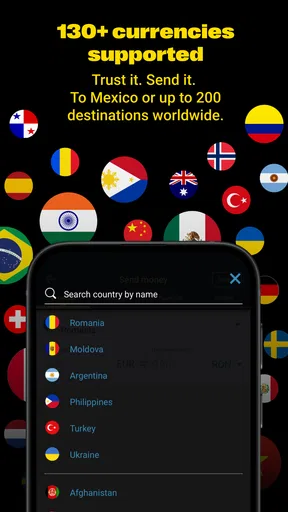
- Extensive global network coverage.
- Secure transactions with encryption.
Cons
- High fees for certain transfer routes.
- Exchange rates may not be competitive.
- Limits on transfer amounts.
- Requires thorough identity verification.
- Occasional app glitches and crashes.
FAQs for Western Union Send Money Now
What features does the Western Union Send Money Now app offer?
The Western Union Send Money Now app allows users to transfer money internationally, track transfers, and check exchange rates. It also offers options for sending money directly to bank accounts, mobile wallets, or for cash pickup at Western Union locations. Additionally, users can pay bills and review past transactions, enhancing its utility.
Is the Western Union app secure for money transfers?
Yes, the app is designed with multiple security measures to protect users' financial information. It employs encryption technology and requires verification steps for transactions. Users must create a secure account and can enable biometric logins for an additional layer of security, ensuring the protection of personal and financial data.
How much does it cost to send money using the app?
The cost of sending money through the Western Union app varies depending on several factors, including the destination, the amount being sent, and the chosen payment method. Users can view estimated fees before completing a transaction, allowing them to make informed decisions based on their budget and needs.
Can I track my money transfer in real-time?
Yes, the Western Union app provides real-time tracking of all money transfers. Users can easily check the status of their transactions through the app, ensuring transparency and peace of mind. Notifications can also be enabled to alert users about any updates or changes in the transfer status.
What are the payment options available on the app?
The app supports various payment methods, including bank transfers, credit and debit cards, and cash payments at participating agent locations. This flexibility allows users to choose the most convenient and cost-effective method for their needs, making the transfer process smoother and more accessible.


